Built for iPhone · No account required

The internet,
with less in the way.

One-tap VPN protection for iPhone. Start with an essential connection at no cost, then choose a region, service or privacy control only when you need it.

4.633K ratings on the US App Store
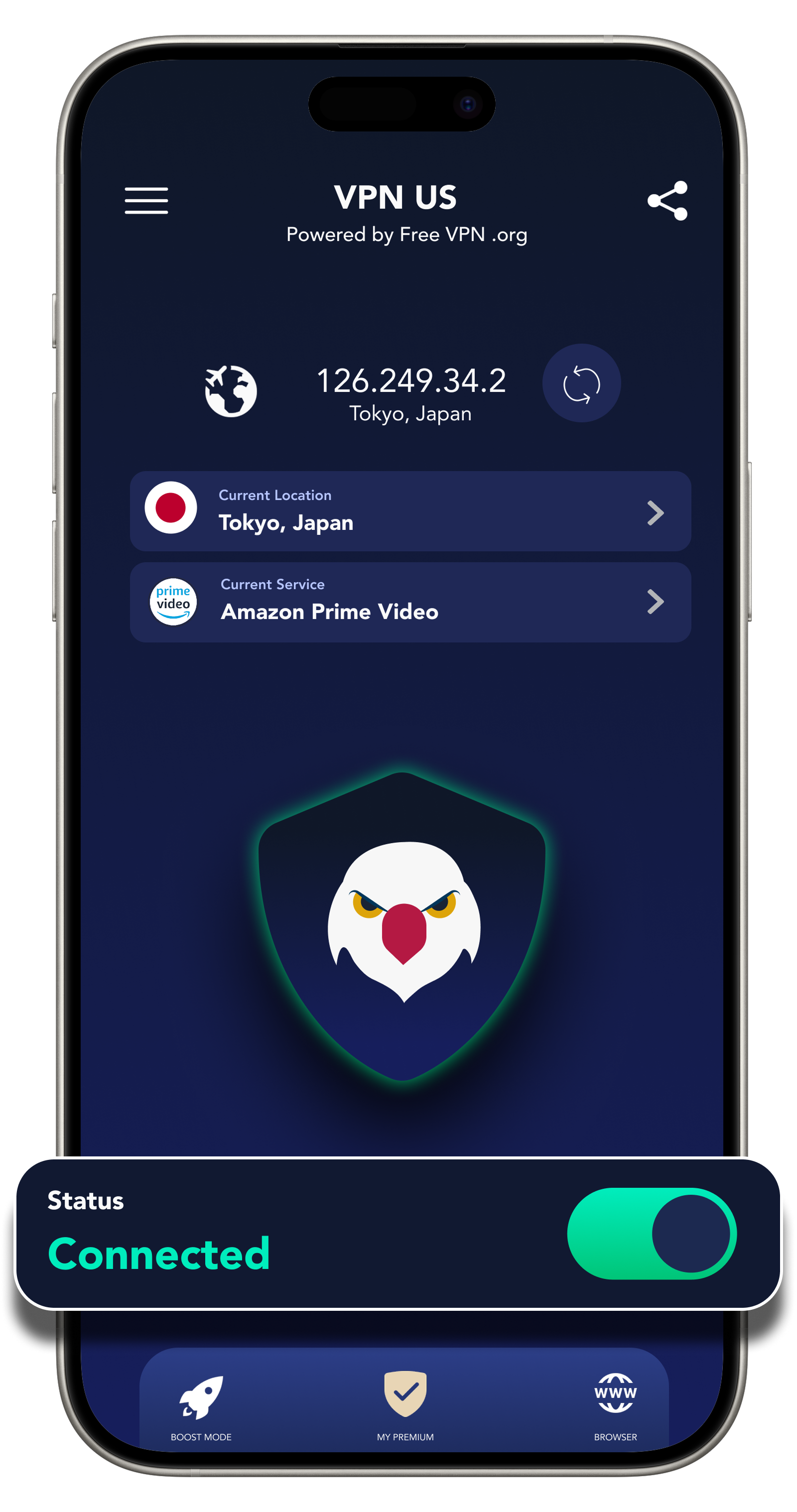
FREE VPN US connected on iPhone
ConnectionProtected
SetupNo account
01 · Start free02 · Choose a region03 · Connect in one tapExplore the experience ↓
No account
Kill Switch
Global regions
Alternate IP
Adblock
Private Browser

Protection should feel like a switch, not a second job.

FREE VPN US keeps the essential decision simple: connect now. Regions, service presets, browser tools and optional Premium controls are there when the moment asks for more.

One app.
Three ways through.

Move from instant protection to a specific place or service without rebuilding your connection from scratch.

Ready when you are

Tap once. Know when you are protected.

Connection status stays unmistakable, so you can protect a café, airport or hotel connection and get back to what you were doing.

Explore all features
01FREE VPN US connected home screen

Three steps.
Zero paperwork.

Need a little help? Open the guide ↗
  1. 01

    Download the app

    Install FREE VPN US from the App Store on your iPhone. You do not need to create an account before you begin.

  2. 02

    Allow the iOS configuration

    Approve Apple's standard VPN permission so the app can create and manage the encrypted connection.

  3. 03

    Choose, then connect

    Use an available region or service preset, tap connect, and check for the active status before continuing.

Begin with privacy.
Upgrade for choice.

The core experience is built to get you connected without a signup wall. Optional Premium choices add more global regions and controls when they are valuable to you.

Core connectionStart free
Email or passwordNot required
More global choicesOptional Premium
Why no-account VPN matters

Built for the moments
that test a connection.

4.633K US App Store ratingsSee verified reviews ↗

The stories below are representative scenarios written to explain product use cases. They are not attributed customer reviews.

01 / STAY PROTECTED
“When the hotel Wi‑Fi drops, I want the connection to stop—not quietly fall back.”

Kill Switch is built for the awkward network changes that happen between a lobby, a room and the road. Pair it with Wi‑Fi Auto Connect for a simpler travel routine.

Explore connection controls ↗Representative scenario · Kill Switch + Wi‑Fi Auto Connect
Connection controlKill Switch enabled in FREE VPN US
02 / SEE THE DIFFERENCE
“I do not just want a blocking switch. I want a clear signal that the protection is doing something.”

The Adblock test turns an invisible privacy control into an understandable result, showing how supported ad and tracker requests respond to the current setup.

Explore Adblock ↗Representative scenario · Adblock + protection score
Measurable protectionAdblock protection score in FREE VPN US
03 / CHOOSE THE MODE
“Some tabs need the VPN. Some need a different route. Some should leave no stored browsing data.”

Browser Modes let each session match the task: Private Network Proxy, Tor Network Proxy, native browsing or browsing without storage.

Compare Browser Modes ↗Representative scenario · Private Browser + per-tab modes
Browser flexibilityBrowser mode choices in FREE VPN US
Verified App Store excerpt
“Your free VPN is very helpful for me.”
amirbeizaee · 5 stars
Verified App Store excerpt
“I was using this app for 1–2 years and it was great.”
lilalienflip · 5 stars

Rating and excerpts checked on the US App Store on September 2, 2026. Excerpts are lightly trimmed for length.

Before your
first tap.

Still looking for something? The complete FAQ and Help Guide cover setup, connections and product controls.

Read every FAQ ↗Open Help Guide ↗
Can I use FREE VPN US without creating an account?

Yes. You can start with the available core connection without entering an email address or creating a password.

Why does my iPhone ask to add a VPN configuration?

Apple requires this standard permission so the app can create and manage a VPN connection on your device.

What is included for free?

You can begin with the core VPN connection and available essential regions. Optional Premium choices shown in the app add more regions and controls.

Can a VPN guarantee access to every app or website?

No. Availability can depend on your network, account, device, location, third-party service rules and local requirements.

Make room for a
freer internet.

Download FREE VPN US for iPhone and make your first connection without creating an account.

Get FREE VPN US